Caching Nix Builds with Cachix
I’ve been using NixOS for some time, while also working towards applying nix to various aspects of my software development lifecycles. My usages of nix have mostly been centered around reproducible/cross platform development environments, but recently, I updated my personal website to be built via nix.11I wrote about this at length in my previous post. Building this site via nix (locally and in CI via Github actions) was my first foray towards building production software with nix.
Across my NixOS system generations and various software projects, I noticed that there is quite a bit of room to benefit from caches. Building and rebuilding software over and over within an ecosystem like nix makes caches incredibly valuable, which is what sparked this interest in nix binary caches for me.
Why bother with caches?
When you write nix expressions and evaluate them, those expressions become derivations that when built, become objects in the /nix/store path. When building a given derivation, the final output that gets stored in the /nix/store is basically a closure that represents that derivation’s store path as well as every transitive dependency reachable from its dependencies, recursively.22For additional context, consult the official nix manual.
This is the fundamental magic of nix: every derivation and build is reproducible since the output relies firmly on the inputs. The store paths/objects are generally input addressable — in that the store location is defined by the hash of all transitive input dependencies.33This not all that different from the action cache in Bazel remote caching, which sits in front of a content addressable store (CAS). What that means more specifically is say your program depends on some source commit 8579cf7, gcc-14, openssl-3.x, and some set of build flags — the identity/location of the derivation of this evaluated build expression can be identified via these inputs and their full, recursive transitive dependency list (perhaps at path like /nix/store/9xyz...-my-app-1.0).
Since nix is operating with dependency closures, certain dependencies might be common across derivations and builds and it doesn’t make sense to have to rebuild those dependencies each time we build a derivation. For example, it wouldn’t be surprising if python 3.12 is a dependency across several of my derivations — for each of the builds associated with those derivations, I should be able to just build python 3.12 once, and then reuse python 3.12’s closure multiple times across the derivations that depend on it. Building once and reusing many times is the essence of the cache’s impact here, and clearly illustrates the build time saved by caches.44Two hard things.
Local and Remote Caches
Like many systems, nix uses multiple levels of caches to help maintain the performance of your builds.55Consulting a local cache and then sequences of remote caches here is similar to DNS resolution, and sourcing AWS credentials when using boto. When you first build a nix derivation, evaluating the closures requires checking if a given dependency is present in the /nix/store — if it is, nix will reuse the locally built version of that dependency; if the dependency is not present in the /nix/store, nix will consult the default remote cache at cache.nixos.org. If not present in the default remote cache, nix will go ahead and build the derviation locally. Once pulled from the remote cache or built locally, future local builds will be able to reuse this built derivation as long as it is not deleted or garbage collected.
Additional Remote Caches
In addition to the local and default remote nix caches, you also have the ability to setup your own remote cache as an additional substituter. The benefit of an additional remote cache is if you want your custom built derivations to be made available to speed up builds across machines or other users you work with. A common example is that perhaps you work on a team that all works on the same service — if the team was using nix, it would make sense to leverage a custom remote nix cache to ensure everyone on the team could benefit from builds being produced (either on someone’s local, or in CI). It’s also common for open source projects to provide their own remote caches to help speed up builds — ghostty is a good example of this.66Ghostty’s cachix cache is configured in their project flake.
Adding an additional remote cache is quite simple — you just add it as a substituter in your nix.settings , like so:
nix.settings = {
  # extra-* appends to the defaults, so cache.nixos.org is preserved.
  extra-substituters = [
    "https://my-cache.provider.org"
  ];
  extra-trusted-public-keys = [
    "my-cache.provider.org-1:..."
  ];
};
More on the trusted public key(s) later – these are necessary to read from the cache. These additional remote caches are consulted during build time.

Note, you can have multiple additional nix caches as substituters – they are considered after the default cache.nixos.org location.
Cachix as a Remote Cache
I explored a few different nix binary caches options, including attic and cachix. Attic was an attractive option since it’s self hosted, and would give more of an opportunity to tweak and tune things. Part of my research was spent also looking into what other folks are using, and it seems like cachix was pretty popular. My goal here was to get up an running with a base cache for exploration reasons, so I opted for cachix. In the future, I may do a post exploring attic as well.
Cachix makes it super simple to get up and running. After creating an account, you can create a cache and mark it as public or private. The public vs. private distinction is important because it has implications for what operations need authentication. Public caches allow anyone to read from the cache unauthenticated, but require authentication to write to the cache; private caches require authentication for reading and writing to the cache.77There’s generally no harm in just using public caches by default, unless you have proprietary software (as in, you’re an enterprise). You also shouldn’t be including sensitive details (like secrets) in your derivations.
Caching NixOS Builds With Cachix
Configuring the cache for use with NixOS is also simple – as mentioned previously, we just add our cache URLs as substituters via the nix.settings.extra-substituters option. Additionally, to properly read from the cache, we also need to set the public keys for these caches via the nix.settings.extra-trusted-public-keys option – the public key can be sourced from cachix. Below is the setting I added to my config – note, I have 2 substituter caches configured: one of them is for my NixOS system builds (across my machines) and one is for builds associated with my Github profile.
nix.settings = {
	# extra-* appends to the defaults, so cache.nixos.org is preserved.
	extra-substituters = [
	  "https://aumitleon-nixos-cache.cachix.org"
	  "https://aumitleon.cachix.org"
	];
	extra-trusted-public-keys = [
	  "aumitleon-nixos-cache.cachix.org-1:EDT4nsToWhEzLYiB+KA3+1+YT0KfTa0rQzw/zeNx/DI="
	  "aumitleon.cachix.org-1:vzqvKKPEBiSsv9X+a6dFDK1SdtfvvF7tGN8V06VMVFU="
	];
};
Pushing to cachix requires you to authenticate using a properly scoped token from cachix. You can easily tokens with read and/or write scope that are tied to your cachix account, or to a particular cachexia the cachix UI. Once you have your token, you just need to authenticate via cachix authtoken <auth-token>.
As I configured the cache for my NixOS builds, I am able to push my system closure using cachix push aumitleon-nixos-cache /run/current-system
Leveraging Cached Builds Across NixOS VMs
I run NixOS across several development surfaces, which include an x86_64 framework desktop, as well as via VMs on Apple Silicon Macs. I’ve catalogued my NixOS setup across my dev logs, and also documented how I spin up new NixOS VMs using VMware Fusion on Macs in my NixOS config README. One of the main goals of spinning up VMs with NixOS is I want it to be reproducible (which nix handles) and I want it to be fast (which the cache helps with). In commit 0458f7e, I enabled the usage of our cachix cache for new builds of my NixOS deployments. I push my NixOS system closure to cachix using cachix push aumitleon-nixos-cache /run/current-system:
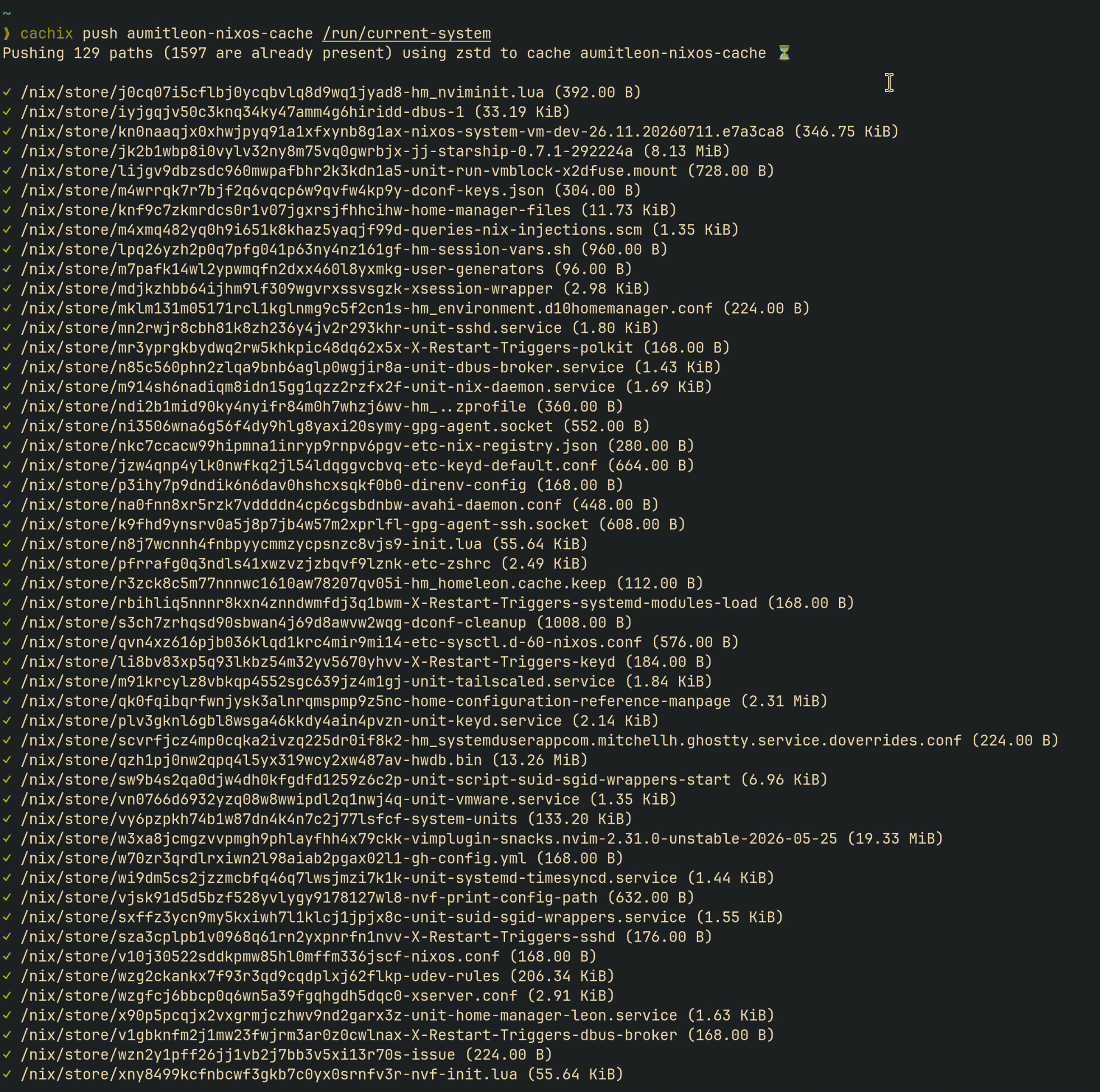
I rebuilt a fresh NixOS system using my cache on my work laptop, which also happens to be an Apple Silicon Mac (aarch64), and was able to complete the bootstrapping in about 5 minutes. It’s inevitable that some portions of the build can’t rely on cache, but most of the build was able to pull from my cache. An important note is that your builds will only have cache hits if the architecture you are building on matches what you have in your cache (i.e., you need to have built and pushed to the cache via the same architecture as you will pull from). This is where cachix is useful, since it’s a multi-tenant cache (multi-platform cache support out of box). Since I already have my NixOS VM spun up on my personal Mac, pushing the system closure to the cache means whenever I need to build the same system from the same architecture but on different physical hardware, the cache will be leveraged!
Leveraging Cached Builds In Github Actions
This site is built with nix88Checkout the nix store path in the footer of the site. and deployed via Github actions, which uses x86_64 runners. Between deploys of my site, not much changes (I don’t add/modify my gems very often) – I am mainly just adding new blog posts. I went ahead and and configured cachix for this site’s Github action build workflow in commit 5cef902.
The main components here were adding the the cachix/cachix-action@1799The cachix Github action definition can be found here. to the workflow and adding a read/write scoped CACHIX_AUTH_TOKEN as a secret to the repo to be used by the action runners.
# Pull prebuilt gems and the site closure from the public Cachix cache,
# and push whatever this run builds back to it. Pulling needs no auth
# (the cache is public); pushing uses the CACHIX_AUTH_TOKEN secret.
- name: Set up Cachix
	uses: cachix/cachix-action@v17
	with:
	  name: aumitleon
	  authToken: '$'
Note, I’m using a different cache than I am for my standard NixOS system. The cache I’m using for this site is aumitleon.cachix.org, which I will be using for all my Github projects moving forward. I kept these separate for now since I want my system closure cache to be independent.
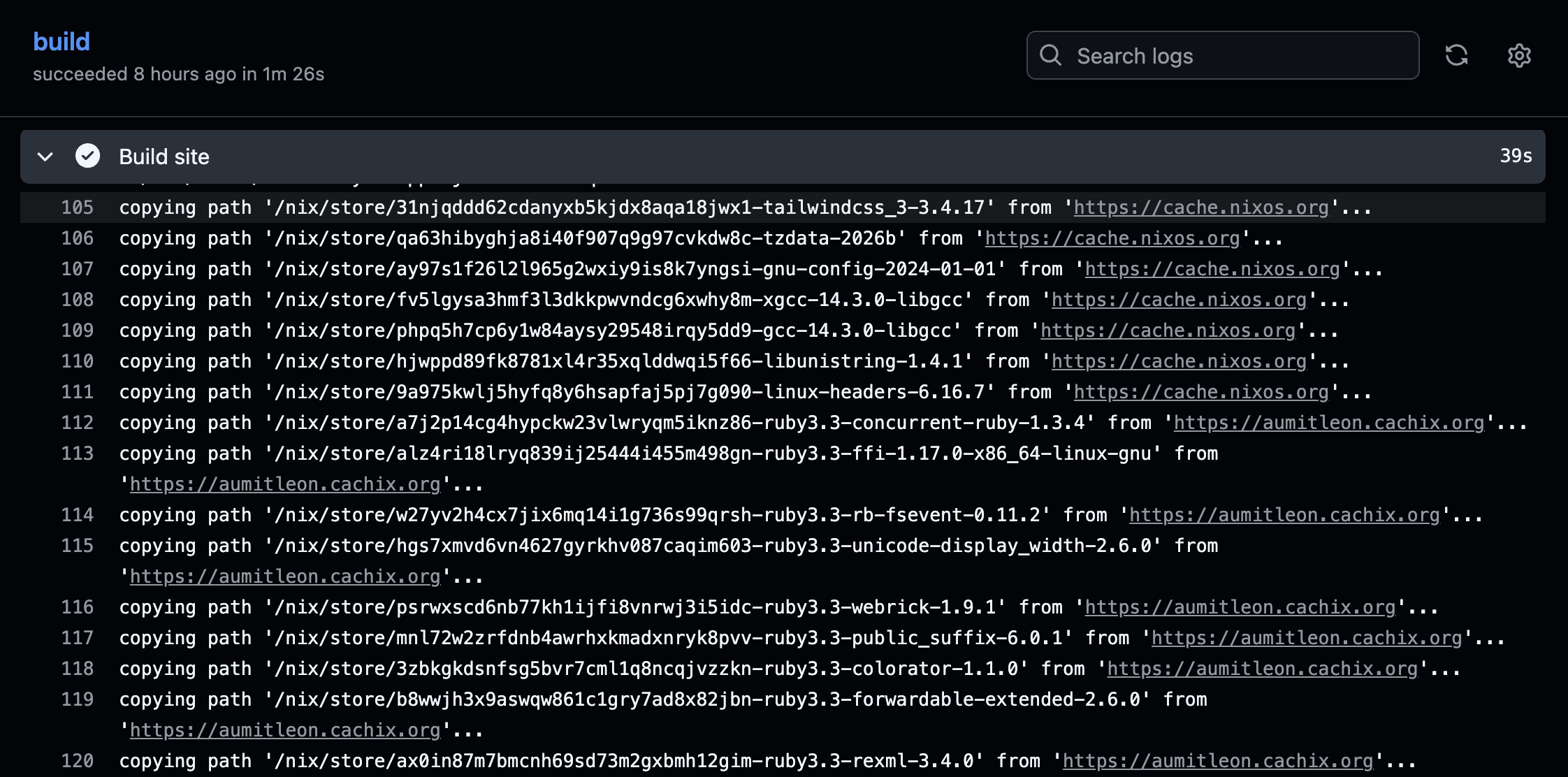
When the site builds in CI, we can see that the cachix cache is effectively being used:
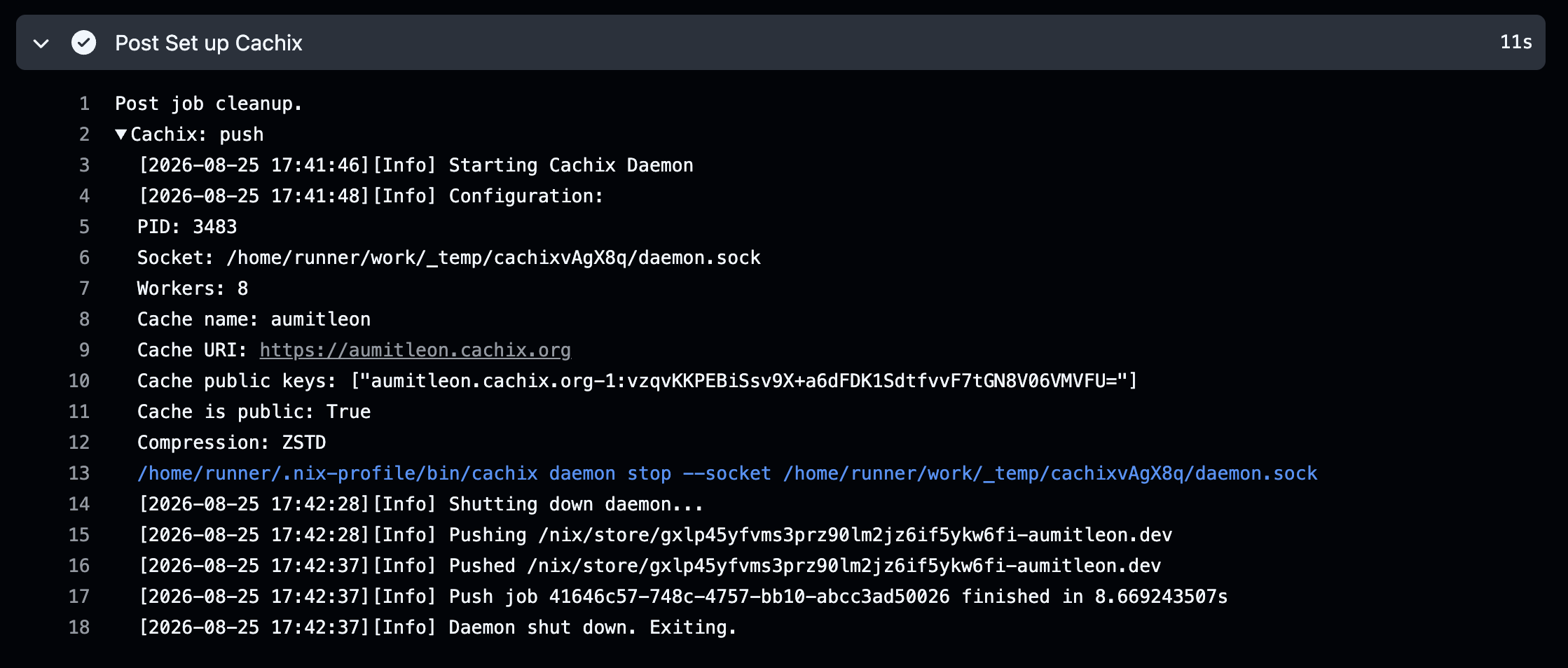
Relatedly, the new build closure is pushed to cachix after the build is complete:
Conclusions
Nix benefits greatly from a strong, multi-tenant cache platform. The primary benefit of reproducible nix builds is that you are able to launch new machines with the same deterministic configuration, but being able to cache expensive builds makes that process much faster. Cachix, which serves as a multi-tenant cache for cross-architecture nix binaries, simplifies both system level (NixOS) and project level cache management.
-
For additional context, consult the official nix manual. ↩
-
This not all that different from the action cache in Bazel remote caching, which sits in front of a content addressable store (CAS). ↩
-
Consulting a local cache and then sequences of remote caches here is similar to DNS resolution, and sourcing AWS credentials when using
boto. ↩ -
Ghostty’s cachix cache is configured in their project flake. ↩
-
There’s generally no harm in just using public caches by default, unless you have proprietary software (as in, you’re an enterprise). You also shouldn’t be including sensitive details (like secrets) in your derivations. ↩
-
Checkout the nix store path in the footer of the site. ↩