Exploring Jujutsu
Jujutsu (jj) is a new version control system (VCS) that claims to be simpler than git. For most people working with software, some level of comfort or familiarity with git is required to actually be productive. Building software is complex, and working with a distributed version control system is absolutely necessary if you’re working on a project with more than one person. What makes jj interesting is that it is a fresh take on a the VCS toolchain that many of us simply tolerate. What if things could be better?
Transitioning to JJ
I consider myself to be competent with git and have developed workflows that work for me over time. I generally follow the standard git flow, where I make all my WIP changes with silly commits like WIP or test 1, but then when I’m satisfied with my changes, I do a git reset, and then craft individual commits with meaningful commit messages for chunks of changes in various files. This works fine.
I started to explore jj, and was immediately interested in the fact that there is no staging area. Everything is a commit, and you can describe a commit (give it a message) before you make any changes (almost like saying, “this is what I intend to do”). I thought this was a pretty cool shift in approach – stating intention before making changes makes more sense than having to craft intention after the fact, for the sake of a clean history.
The concept of the working copy (@) was also fascinating. All of your pending changes are part of the working copy, which you can provide a description to (using jj describe) – this becomes an atomic commit once you create a new working copy. For example, for the branch that will create this blog entry, I first created the branch (or bookmark, as they are known in jj):
❯ jj bookmark create jujutsu-blog
I then “checked out” the new branch by specifying a new working change on that bookmark:
❯ jj new jujutsu-blog
Working copy  (@) now at: pklrlrlr 28fc1edc (empty) (no description set)
Parent commit (@-)      : zslzyrmt bf6821e9 jujutsu-blog | blog: jujutsu exploration
Added 1 files, modified 0 files, removed 0 files
Next, I gave the new empty change a description (the commit message):
❯ jj describe -m "blog: jujutsu blog"
I then copied an existing blog post, changed the metadata, and pushed it up (effectively a WIP commit).
❯ jj git push --bookmark jujutsu-blog --allow-new
I did this setup from my NixOS VM thus far, but I wanted to do the writing for this blog from my Mac host. So from my Mac host, I pulled down the branch and tracked it:
❯ jj bookmark track jujutsu-blog@origin
Finally, I can see the log:
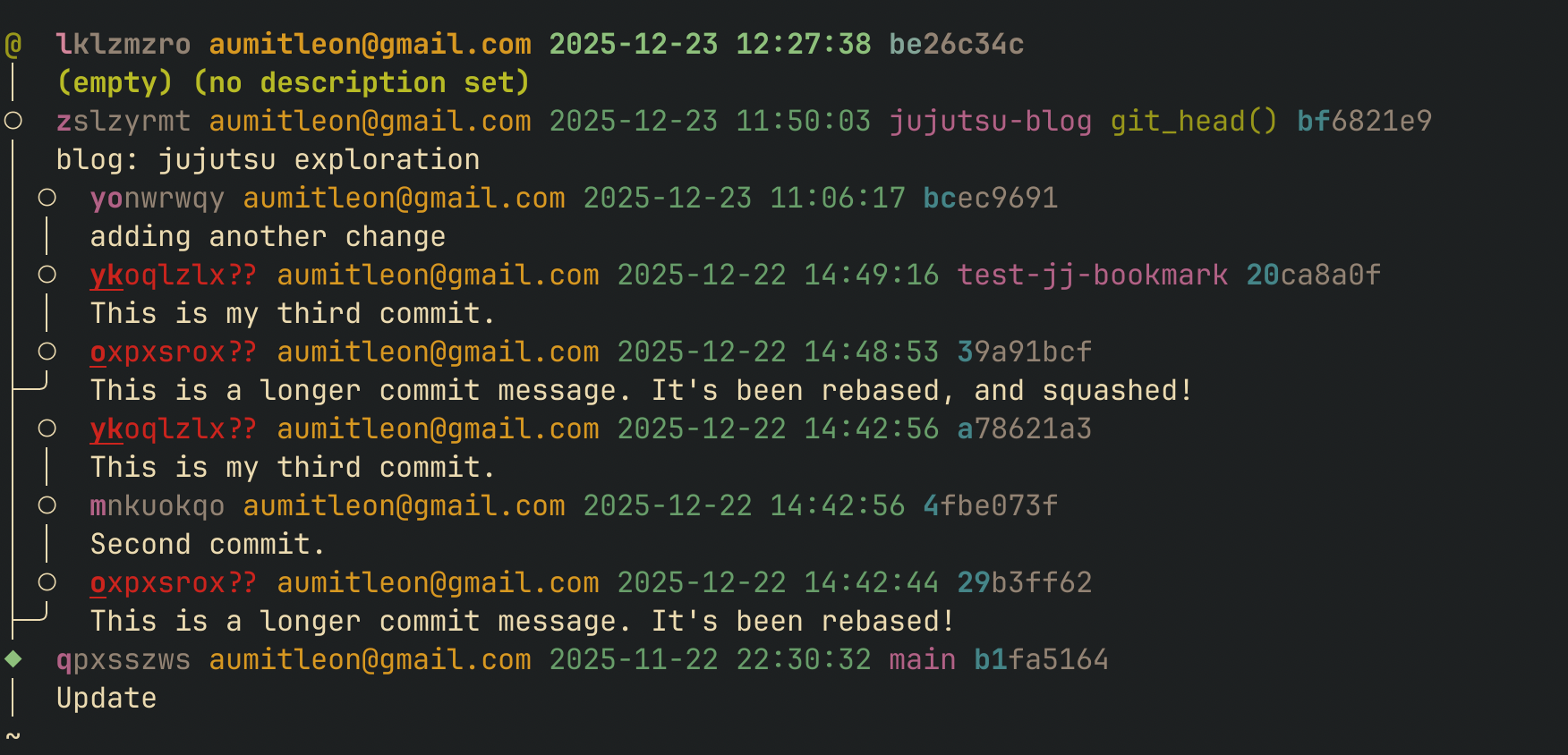
There’s a couple cool things to call out about the log. For starters, I see at the top, @ represents my current working copy (current set of changes). I can also see that every line has something that looks like a short commit SHA (which is a standard git artifact), but also a change ID. For example, the current working change’s parent has change ID zslzyrmt and short commit SHA bf6821e9. The reason for 2 IDs is that while jj as a distributed VCS still needs to be content addressable (and therefore needs a commit SHA that evolves as changes are made and rebases are executed), it is also useful to have a stable, logical identifier for changes that can persist beyond rebases. This is super helpful for a developer trying to reason about what sorts of changes they are making during a tricky rebase, and how things connect before and after.
The branching here is very obvious. jujutsu-blog is branched off of main. We can even see other branches that are branched off of main at particular times. Finally, the color coding is what I find to be most useful here. You’ll notice for the change IDs and commit SHAs, only a portion of those IDs are in color and the rest are grayed out – this is jj indicating to you the minimal set of prefix characters that uniquely identify a revision! So you wanted to take an action on a specific revision, you could just identify it with the colored portion as opposed to having to copy/paste the entire ID.
Back to the working example – now that I’ve completed the blog entry, I just want to rebase (squash) this change onto my existing change. I can do that really easily by just choosing which commits I want to squash:
❯ jj squash --from zy --into zs
Working copy  (@) now at: uqzklkwr 9890706c (empty) (no description set)
Parent commit (@-)      : zslzyrmt 39e0e906 jujutsu-blog* | blog: jujutsu exploration
The really great thing about jj is that it can work alongside git. So you can try jj on an existing git repo, and see if it works with your workflow. As I was getting started, I found it useful to view the git log in conjunction with the jj log to better understand how things were actually working.
Some Pitfalls
The jj model is really powerful, and is a lot simpler than git, but it does take some getting used to. What kept tripping me up is that when you create a new bookmark, jj doesn’t automatically move your current working copy to the tip of that new bookmark, sort of like you’d expect when doing a new git checkout -b .... So in addition to creating the new bookmark, you also need to set your working copy to the tip of the new bookmark using jj new <your-bookmark-name>. As I get more familiar with the tool, I’m not sure these types of issues will even be real issues, since they can also be solved away with aliases.
Conclusions
jj is really interesting, and I can see myself fully switching over to it. I particularly like how jj aligns better with developer workflows and is just as powerful as git, but with less specific commands to memorize.
As with any new tool, there’s a mix of shiny-new-tool syndrome, as well as the learning curve of a new VCS that forces me to reconsider and re-learn habits embedded into my workflows over years as a developer, but I think that’s what makes being an engineer fun. There are always new tools to explore and learn about, and it’s awesome that git has some new competition. As engineers, we need to constantly stay on top of trends to make sure we’re learning and evaluating new technology as it comes out, and jj is the perfect excuse to do just that.